A power station inverter typically beeps to signal a critical issue such as low battery voltage, an overload, overheating, or loose connections. These audible warnings are safety features designed to protect the unit and connected devices from potential damage. Addressing these alerts promptly by checking the display, reducing the load, ensuring adequate charging, or improving ventilation can resolve most issues and prevent long-term damage to your portable power station.
Understanding Your Power Station’s Warning: Why Inverters Beep
A power station is a versatile portable power solution, typically combining a large-capacity battery, an inverter to convert DC battery power into usable AC electricity, and various output ports. The inverter is the brain of this system, ensuring a stable power supply to your devices. When it beeps, it’s a built-in alert system designed to notify you when something is amiss, safeguarding both the unit and your connected electronics.
The specific pattern or frequency of beeps often indicates the nature of the problem, although these can vary between brands and models. Recognizing these signals is the first step toward a quick resolution. Ignoring these warnings can lead to reduced performance, battery degradation, or even permanent damage to your power station, making prompt action essential for its longevity and your energy independence.
The Language of Beeps: Common Causes
Understanding the common culprits behind an inverter’s beeping can help you quickly diagnose and address the issue. Each warning sound is a cue, signaling a specific condition that the power station deems critical enough to alert you. These are the most frequent reasons your power station might start beeping.
Low Battery Voltage
This is arguably the most common reason for an inverter to beep, signaling that the power station’s battery charge has dropped below a safe operating threshold. The inverter protects itself and the battery from over-discharge, which can significantly shorten battery lifespan. It’s an urgent call for you to recharge the unit or disconnect devices.
Overload
An overload alert occurs when the total power demand from connected devices exceeds the inverter’s maximum rated capacity. The inverter beeps to warn you that it cannot handle the current load, preventing damage to its internal components. Continuous overloading can cause the inverter to shut down or, in severe cases, sustain permanent damage.
Overheating
Inverters generate heat during operation, especially when under heavy load or in warm environments. If the internal temperature rises beyond safe limits, the thermal protection system activates, causing the inverter to beep. This warning prevents damage to sensitive electronic components and extends the lifespan of the unit.
Loose Connections or Incorrect Wiring
Faulty or loose connections, corroded battery terminals, or even using incorrectly sized battery cables can disrupt the flow of power, leading to voltage drops and erratic behavior. The inverter’s sensors detect these inconsistencies and trigger an alarm to alert you to a potential wiring issue that needs immediate attention.
Internal Faults or Errors
Sometimes, the beeping indicates a more complex internal error, such as a short circuit, component malfunction, or system fault. Modern power stations often have diagnostic displays that provide specific error codes. These alerts are crucial for identifying issues that might require professional intervention if simple troubleshooting doesn’t resolve them.
Immediate Actions: Quick DIY Steps to Stop the Beeping
When your power station starts beeping, staying calm and following a structured troubleshooting approach can quickly identify and resolve the problem. Many issues can be fixed with simple DIY steps, saving you time and potentially avoiding costly repairs.
Check the Display and Indicator Lights
|
Our Picks for the Best Power Station in 2026
As an Amazon Associate I earn from qualifying purchases.
|
||
| Num | Product | Action |
|---|---|---|
| 1 | Anker SOLIX F3800 Portable Power Station, 3840Wh, LiFePO4 Batteries, Ultra-High 6000W AC Output with 120V/240V, Solar Generator for Home Backup, RVs, Emergencies, Power Outages, and Outdoor Camping |

|
| 2 | BLUETTI Portable Power Station AC180, 1152Wh LiFePO4 Battery Backup w/ 2 1800W (2700W peak) AC Outlets, 0-80% in 45Min, Solar Generator for Camping, Off-grid, Power Outage |
|
| 3 | Jackery Explorer 2000 v2 Portable Power Station with 2x200W Solar Panels, 2042Wh LiFePo4 Battery, 2200W Solar Generator, 20ms UPS, USB-C PD 100W Fast Charging for Power Outages, Emergencies, Camping |
|
| 4 | Anker SOLIX C300 Portable Power Station with Car Charging Cable, Outdoor 288Wh LiFePO4 Battery, 300W (600W Surge) Solar Generator, 140W Two-Way Fast Charging, for Camping, Traveling, and Emergencies. |
|
| 5 | Westinghouse 155Wh 150 Peak Watt Portable Power Station & Solar Generator, Modified Sine Wave AC Outlet, Backup Lithium Battery for Camping, Home, Travel, Indoor/Outdoor Use (Solar Panel Not Included) |
|
| 6 | 550W Portable Power Inverter Compatible with Dewalt 20V Battery, Power Station DC 20V to AC 110V Pure Sine Wave, Battery Power Adapter 2USB&Type-C, Generator Phone Charger LED Light Camping Emergency |
|
| 7 | 550W Power Station Compatible with Dewalt: LIVOWALNY Portable Generator DC 20V to AC 110-120V, Pure Sine Wave Power Inverter Battery Adapter Phone Charger 2 USB-A & 1 Type-C & 2 AC Outlet (Tool Only) |
|
| 8 | Anker SOLIX C1000 Gen 2 Portable Power Station, 2,000W (Peak 3,000W) Solar Generator, Full Charge in 49 Min, 1,024Wh LiFePO4 Battery for Home Backup, Power Outages, and Camping (Optional Solar Panel) |
|
| 9 | UGREEN Power Strip Surge Protector with 4 Power Outlets, 15w Wireless Charger, 20W PD3.0 USB C Fast Charging, 2 USB-C Ports, 2 USB A Ports, Desk Charging Station for Office, Conference, Home Use |
|
| 10 | Anker SOLIX C1000 Portable Power Station, 1800W (Peak 2400W) Solar Generator, Full Charge in 58 Min, 1056wh LiFePO4 Battery for Home Backup, Power Outages, and Outdoor Camping (Optional Solar Panel) |
|
Begin by examining your power station’s display screen or indicator lights. Many modern inverters feature LCD screens that show error codes or specific icons representing the problem (e.g., a low battery symbol, an overload icon, or a temperature warning). Refer to your power station’s user manual to understand what these codes or lights signify, as this is often the fastest way to pinpoint the exact issue.
Reduce the Load
If you suspect an overload, immediately unplug non-essential devices from the power station. Start with high-wattage appliances like hair dryers, electric kettles, or power tools. Once the load is reduced, the beeping should stop, indicating that the inverter can now handle the remaining devices within its capacity. This is a quick and effective way to relieve strain on the system.
Ensure Adequate Charging
A low battery is a common culprit. If your power station is connected to a charging source (grid power, solar panels, or car charger), ensure it’s functioning correctly. Check that the charging cables are securely connected and the power source is active. Allow the battery to charge fully; this might take several hours, depending on the battery capacity and charging input. If using solar, ensure panels are clean and positioned for optimal sunlight.
Inspect Connections
Carefully inspect all connections between the power station, its battery (if external), and any power sources or output devices. Look for loose wires, signs of corrosion on battery terminals, or damaged cables. Tighten any loose connections and clean corroded terminals with a wire brush and a baking soda solution (for lead-acid batteries) or specialized cleaner. Secure connections ensure stable power flow and prevent voltage drops.
Improve Ventilation and Cooling
If the power station feels hot to the touch or the display shows a temperature warning, it might be overheating. Ensure the unit is placed in a cool, dry, and well-ventilated area, away from direct sunlight or heat sources. Clear any dust or debris that might be blocking the ventilation vents. Disconnecting some devices can also reduce the load, thereby lowering the heat generated by the inverter. Allow the unit to cool down before restarting it.
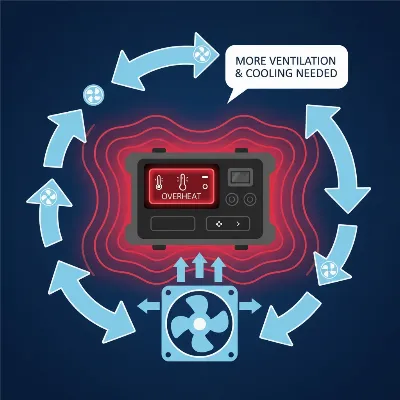 Power station overheating, with an emphasis on improving ventilation for cooling
Perform a Soft Reset
Sometimes, a temporary glitch or software error can cause the inverter to beep. Performing a soft reset can often resolve these minor issues. Turn off the power station completely, disconnect it from all charging sources and connected devices, wait for a few minutes (e.g., 5-10 minutes), then reconnect everything and turn it back on. This simple power cycle can often clear internal errors and restore normal operation.
Long-Term Solutions and Prevention: Keeping Your Power Station Quiet
While quick fixes address immediate beeping, implementing long-term strategies and preventive maintenance is crucial for maintaining your power station’s health and preventing future alarms. These practices extend the lifespan of your unit and ensure reliable power for years to come.
Regular Maintenance is Key
Consistent maintenance is vital for any power station. Regularly clean the exterior of your unit, paying special attention to the ventilation grilles, to prevent dust and debris buildup that can impede airflow and cause overheating. Periodically check all cables and connections for wear, tear, or corrosion, ensuring they remain secure and functional. A well-maintained unit is less likely to surprise you with unexpected beeps.
Assess Your Power Needs
Prevention often involves understanding your energy consumption. Take stock of all the devices you intend to power and their individual wattage requirements. Compare the total load to your power station’s continuous and peak inverter capacity. If your typical usage frequently pushes the limits, it might be an indication that your current power station is undersized for your needs. An upgrade to a higher-capacity model could be a wise investment to avoid constant overloads.
Battery Health Management
The battery is the heart of your power station, and its health directly impacts performance. If your battery is old, frequently deep-discharged, or simply isn’t holding a charge as it used to, it might be the underlying cause of low voltage alarms. Consider getting a battery health check from a professional or, if necessary, replacing an aging battery. Following proper charging cycles—avoiding constant 100% charges and deep discharges—can significantly extend its lifespan.
> “Understanding your power station’s battery chemistry and charging habits is paramount. Consistent partial discharges are often better than frequent full cycles for lithium-ion longevity.” – Alex Chen, Lead Energy Systems Engineer
Optimizing Placement
The environment in which you operate and store your power station plays a significant role in its performance. Always place the unit in a cool, dry, and dust-free area with ample airflow. Avoid confined spaces, direct sunlight, or locations near heat-generating appliances. Proper placement minimizes the risk of overheating and protects internal components from environmental stressors, contributing to silent, efficient operation.
Using Correct Wiring
If your power station allows for external battery connections or custom wiring, ensure you are using the correct gauge (thickness) of battery cables specified in the manufacturer’s manual. Undersized cables can lead to significant voltage drop, especially under load, which the inverter might interpret as a low voltage condition, triggering beeps. Investing in the correct, high-quality wiring is a fundamental step for stable power delivery.
Power Station Models: A Brief Comparison
While the core reasons for inverter beeping are universal across most power stations, the way these warnings are communicated can vary. Entry-level models might rely on simple indicator lights and repetitive beeps, while more advanced units often feature detailed LCD screens that display specific error codes and real-time operational data. Some premium power stations even offer app connectivity, sending alerts directly to your smartphone, which can be incredibly helpful for remote monitoring and quicker diagnosis. Always consult your specific model’s manual to interpret its unique warning signals.
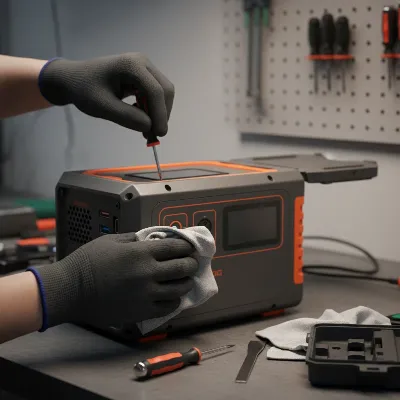 Close-up of a hand performing maintenance on a power station, with tools
Tips for Using and Maintaining Your Power Station
To ensure your power station remains a reliable and silent partner, proper usage and consistent maintenance are key. These tips will help extend its life and prevent common issues. Always refer to your specific model’s manual for detailed instructions, as recommendations can vary based on battery chemistry and design.
Charge your power station regularly, especially if it’s been stored for a long period. Most manufacturers recommend charging to at least 50-80% capacity every 3-6 months to prevent deep discharge, which can permanently damage the battery. Avoid fully draining the battery whenever possible, as partial discharges generally contribute to a longer overall lifespan for lithium-ion cells. Store your power station in a cool, dry place, ideally between 32°F and 104°F (0°C and 40°C). Extreme temperatures, both hot and cold, can negatively impact battery performance and longevity. Keep it away from direct sunlight and areas with high humidity to prevent internal damage.
Regularly clean the exterior of your power station with a dry, soft cloth. Pay attention to vents and ports to ensure they are free from dust, dirt, and debris, which can obstruct airflow and lead to overheating. Never immerse the unit in water or use harsh chemicals for cleaning. Check all cables and connections periodically for any signs of wear, fraying, or corrosion. Ensure all plugs are securely seated to prevent intermittent power flow or electrical shorts. Addressing these small issues proactively can prevent major problems down the line.
Conclusion
A beeping power station inverter is rarely a sign of total failure but rather a crucial indicator that something needs your attention. By understanding the common causes—from low battery and overloads to overheating and loose connections—you can confidently troubleshoot most issues with simple DIY steps. Prioritizing regular maintenance, assessing your power needs, and optimizing your unit’s environment are not just about silencing an annoying alarm; they are vital practices for extending the lifespan and ensuring the reliable performance of your portable energy solution. Don’t let a beep turn into a bigger problem; take action promptly and empower your adventures with quiet, consistent power.
What steps will you take today to ensure your power station stays quiet and ready for your next adventure?
Frequently Asked Questions
Can I disable the beeping sound on my power station?
While some power stations may offer an option to silence or lower the volume of non-critical alerts, such as a standby mode notification, it is generally not recommended or even possible to disable critical warning beeps. These alarms are safety features designed to protect the unit and connected devices from damage. Disabling them would remove important warnings for issues like low battery, overload, or overheating, potentially leading to more severe problems. Always consult your user manual for specific settings.
How often should I check my power station battery?
It’s advisable to check your power station’s battery level and overall health regularly, especially if it’s stored for extended periods or used frequently. For optimal longevity, aim to check and partially recharge it every 3-6 months to maintain a charge level between 50-80%. If you use it often, pay attention to how quickly it discharges or if it struggles under typical loads, which could indicate battery degradation.
What should I do if the beeping continues after troubleshooting?
If you’ve followed all the DIY troubleshooting steps and your power station inverter continues to beep, it’s likely indicative of a more complex internal fault or a persistent issue that requires professional attention. In such cases, it’s best to stop using the unit and contact the manufacturer’s customer support or a certified technician. Provide them with details of the beeping pattern, any error codes displayed, and the steps you’ve already taken.
Frequently Asked Questions
Why does my portable power station inverter keep beeping?
Your portable power station inverter beeps to alert you to critical issues such as low battery voltage, an overloaded circuit, internal overheating, or loose electrical connections. These alerts are safety mechanisms to prevent damage to the unit and connected devices, often indicated by specific patterns or error codes on the display.
Can I disable the beeping sound on my power station?
While some power stations may offer options to silence non-critical alerts, it is generally not possible or recommended to disable critical warning beeps. These alarms are essential safety features designed to protect the unit from damage due to issues like low battery or overload. Always consult your user manual for specific settings.
How often should I check my power station battery health?
It's advisable to check your power station's battery level and overall health regularly, especially if stored for extended periods. For optimal longevity, aim to check and partially recharge it every 3-6 months to maintain a charge level between 50-80% capacity, preventing deep discharge.
What should I do if the beeping continues after troubleshooting?
If you've followed all DIY troubleshooting steps and your power station inverter continues to beep, it likely indicates a more complex internal fault. In such cases, stop using the unit and contact the manufacturer's customer support or a certified technician, providing details of the beeping pattern and any error codes.
What are the most common reasons for a power station to beep?
The most common reasons for a power station to beep include low battery voltage, exceeding the inverter's maximum rated capacity (overload), the unit overheating due to heavy load or poor ventilation, and loose or incorrect wiring. Internal faults or errors can also trigger these alarms.
How to Stop Your Power Station Inverter from Beeping
Follow these steps to diagnose and resolve common issues causing your portable power station's inverter to beep, ensuring safe and reliable operation.
Examine your power station's display screen or indicator lights for error codes or specific icons. Consult your user manual to understand what these signals mean, as they often pinpoint the exact problem quickly.
If you suspect an overload, immediately unplug non-essential, high-wattage devices from the power station. This action reduces strain on the inverter, and the beeping should stop once the load is within capacity.
If the battery is low, verify that your power station is connected to a functioning charging source and that cables are secure. Allow the battery to charge fully, which may take several hours depending on capacity and input.
Carefully check all connections between the power station, its battery, and any power sources or output devices. Look for loose wires, corrosion on terminals, or damaged cables, and tighten or clean as necessary to ensure stable power flow.
If the unit is hot, place it in a cool, dry, well-ventilated area away from direct sunlight. Clear any dust from vents to improve airflow. Disconnecting some devices can also reduce heat generation; allow the unit to cool before restarting.

This was super helpful for understanding why my power station was constantly alarming. I realized I was trying to run too many high-wattage appliances at once, causing an overload. Now I’m more mindful of my total draw and haven’t had the beeping problem since. It’s a great reminder to always check the display for error codes first.
I was having a persistent beeping issue with my Jackery 1000 and couldn’t figure it out. The tip about checking for loose connections was a lifesaver! Turns out one of my solar panel cables wasn’t fully seated. Fixed it in seconds and the annoying alarm stopped immediately. So glad I found this info before calling customer service.
My Goal Zero Yeti keeps beeping when it’s really hot outside, and I was hoping for a magic fix. The advice on improving ventilation is good, but sometimes it’s just unavoidable in the summer sun. I wish there was a better way to cool these units down without having to move them into the shade every hour. Still, good to know it’s likely an overheating issue.
Excellent breakdown of common power station problems. My Bluetti AC200P started beeping with a low battery warning even though I thought it was charged. Turns out I hadn’t properly connected it to my solar array for a few days. The explanation of low battery voltage as a cause made perfect sense. Thanks for the clear, actionable steps!