Replacing the battery in a portable power station is a practical way to extend its lifespan and restore optimal performance, especially when the original battery shows signs of degradation like reduced run time or slow charging. This process typically involves safely disassembling the unit, disconnecting the old battery, installing a new one that matches specifications, and reassembling the power station. For example, upgrading from an older lithium-ion (NMC) battery to a LiFePO4 battery can significantly enhance longevity and safety, as LiFePO4 batteries offer over 3500 charge cycles compared to the 800-1000 cycles of NMC types.
What is a Portable Power Station?
A portable power station is essentially a large, rechargeable battery pack equipped with an inverter and various output ports. These devices store electrical energy, converting it from direct current (DC) into alternating current (AC) to power household appliances, alongside USB and DC outputs for charging smaller electronics. Compact and versatile, they offer an eco-friendly alternative to traditional fuel generators, providing quiet, fume-free power for everything from camping trips to emergency home backup.
Why Replace Your Portable Power Station Battery?
The battery is the core component determining the lifespan and performance of your portable power station. Over time, all rechargeable batteries experience a decline in capacity and efficiency due to repeated charge and discharge cycles, as well as natural aging. You might notice your power station isn’t holding a charge as long as it used to, or it struggles to power devices it once handled easily. Common indicators that your battery might need replacing include: For expert portable power reviews on this site.
- Reduced Run Time: The power station dies much faster than before, even after a full charge.
- Slow Charging: It takes significantly longer to fully charge the battery.
- Low Voltage Alarms: The unit frequently triggers low voltage warnings even with moderate loads.
- Inability to Hold Charge: The battery quickly drains when not in use.
- Physical Damage: Swelling, leaks, or corrosion around the battery terminals are critical signs requiring immediate attention.
Ignoring these signs can lead to further degradation of your power station’s overall performance and, in some cases, potential safety hazards.
Types of Batteries in Portable Power Stations
Understanding the type of battery in your portable power station is crucial for replacement, as different chemistries offer distinct advantages and require specific handling.
- Lead-Acid Batteries: Traditionally used in larger, less portable generators, lead-acid batteries are affordable but heavy, have shorter lifespans (typically 500-1000 cycles), and require more maintenance. They are less common in modern portable power stations due to weight and longevity concerns.
- Lithium-ion (NMC) Batteries: Lithium Nickel Manganese Cobalt (NMC) batteries are popular in many consumer electronics and earlier portable power stations. They are lighter and offer a good energy density but typically have a shorter cycle life (around 800-1000 cycles) compared to LiFePO4, and can pose greater thermal safety risks if damaged.
- Lithium Iron Phosphate (LiFePO4) Batteries: Often considered the gold standard for portable power stations today, LiFePO4 batteries boast an impressive lifespan (over 3500 cycles), superior thermal stability, and enhanced safety. While slightly heavier than NMC, their durability and long-term reliability make them an excellent choice for consistent, heavy-duty use. Many modern power stations, like those from Anker and OUPES, utilize LiFePO4 technology for its longevity and stable performance.
The choice of replacement battery should ideally match the original type or be an upgrade to a compatible, safer, and longer-lasting option like LiFePO4, provided your power station supports it. Always check your device’s specifications before making a switch.
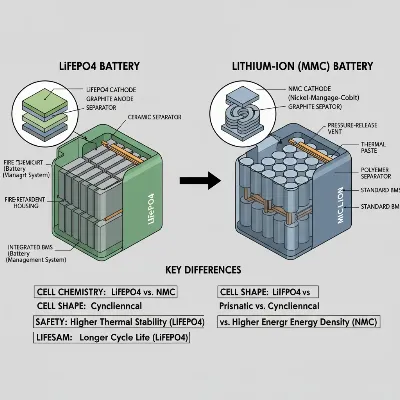 A visual comparison of different portable power station battery types like LiFePO4 and Lithium-ion, highlighting their internal structures.
Essential Tools and Safety Gear for Battery Replacement
Before you begin any work on your portable power station, gathering the right tools and prioritizing safety are paramount. Electrical components can be dangerous if mishandled.
Required Tools:
- Screwdriver Set: A variety of Phillips head and flathead screwdrivers will likely be needed to open the power station casing.
- Wrench Set: For loosening and tightening battery terminals.
- Multimeter: Useful for checking battery voltage and ensuring no residual power.
Safety Gear:
- Insulated Tools: Crucial for preventing accidental short circuits.
- Rubber Gloves and Boots: Provide insulation against electrical shock and protection from potential acid spills (especially for lead-acid batteries).
- Safety Goggles: Protect your eyes from splashes or debris.
- Protective Clothing: Long sleeves and pants can protect your skin from accidental contact with battery components.
- Fire Extinguisher: A small ABC type extinguisher nearby is a wise precaution when working with batteries.
Safety Precautions:
- Power Down Completely: Ensure the power station is turned off and disconnected from all charging sources (AC, solar, car charger).
- Remove Jewelry: Metallic jewelry can conduct electricity and cause short circuits or burns.
- Work in a Ventilated Area: Especially important for lead-acid batteries which can emit gases.
- Avoid Sparks and Open Flames: Keep the work area free from anything that could ignite gases.
- Discharge Static Electricity: Touch a grounded metal object before handling the battery.
- Read the Manual: Always consult your power station’s owner’s manual for model-specific instructions and warnings.
Step-by-Step Guide to Replacing Your Portable Power Station Battery
While specific steps may vary depending on your power station model, this general guide provides a comprehensive overview of the battery replacement process.
-
Preparation and Disassembly:
- Place the power station on a stable, dry, and non-conductive surface.
- Ensure it is completely powered off and unplugged from all charging and output sources.
- Locate and remove the screws securing the casing of your portable power station. These are often on the back, sides, or bottom. Carefully open the casing, noting how components are arranged.
-
Locate the Battery:
- Once the casing is open, identify the battery pack. It will typically be the largest component inside.
- Observe how it’s connected to the power station’s internal circuitry. Take photos if it helps you remember the connections.
-
Disconnect the Old Battery Safely:
- Crucially, always disconnect the negative (-) terminal first. The negative terminal is usually black. This reduces the risk of a short circuit if your tool accidentally touches a grounded metal part while disconnecting the positive terminal.
- Use an insulated wrench to loosen the bolt on the negative terminal, then carefully remove the cable.
- Next, disconnect the positive (+) terminal (usually red) in the same manner.
- If there are any other securing straps or brackets, remove them.
-
Remove the Old Battery:
- Carefully lift the old battery out of its compartment. Batteries can be heavy, so lift with care.
- Set the old battery aside in a safe place. Proper disposal of old batteries is essential; do not simply throw them in the trash.
-
Install the New Battery:
- Place the new battery into the compartment, ensuring it fits snugly and is oriented correctly.
- When reconnecting, always attach the positive (+) terminal first. Connect the red cable to the positive terminal and tighten the bolt securely with your insulated wrench.
- Next, connect the negative (-) terminal. Attach the black cable to the negative terminal and tighten the bolt. Ensure all connections are firm to prevent arcing or poor performance.
-
Reassemble the Power Station:
- Carefully replace any securing hardware, straps, or brackets you removed earlier.
- Gently close the power station casing, making sure no wires are pinched.
- Replace all the screws you removed during disassembly, tightening them firmly but without over-tightening.
-
Initial Test and Charge:
- Once fully reassembled, plug your portable power station into its charger.
- Observe the charging indicator to ensure it’s charging correctly.
- Allow the battery to fully charge before its first use.
> “Always remember, safety is paramount. Disconnecting the negative terminal first and reconnecting it last is a fundamental electrical safety rule that minimizes short-circuit risks during battery replacement.” – Admin, ReviewScatch.com, Power Solutions Technician
Choosing the Right Replacement Battery
Selecting the correct replacement battery is crucial for the performance and safety of your power station.
- Match Specifications: The new battery must match the voltage (V) and typically the amp-hour (Ah) or watt-hour (Wh) capacity of the original battery, or be a compatible upgrade specified by the manufacturer. Deviating from the voltage can damage your power station.
- Physical Size and Terminals: Ensure the new battery has the same physical dimensions and terminal type (e.g., F2 terminals, bolt-on terminals) as the old one to fit correctly and connect easily.
- Battery Chemistry: As discussed, LiFePO4 batteries offer significant advantages in lifespan and safety over traditional lithium-ion or lead-acid. If your power station is compatible, upgrading to LiFePO4 can be a worthwhile investment.
- Reputable Brands: Purchase replacement batteries from trusted manufacturers known for quality and safety. Avoid generic or unbranded batteries, which may not meet safety standards.
Tips for Maintaining Your New Battery
To maximize the lifespan and performance of your newly installed battery:
- Charge Properly: Use only the charger provided by the manufacturer or a compatible replacement. Avoid overcharging; disconnect the power station once it reaches full capacity.
- Regular Recharges for Storage: If storing your power station for an extended period, recharge it every few months to prevent deep discharge, which can permanently damage the battery. Aim for a 50-80% charge level for long-term storage.
- Optimal Temperature: Operate and store your power station within the manufacturer’s recommended temperature range. Extreme temperatures can degrade battery performance and shorten its life.
- Avoid Overloading: Do not connect devices that collectively exceed the maximum output capacity of your power station. Overloading can stress the battery and the internal components.
- Keep Dry and Ventilated: Protect your power station from water and ensure it has adequate ventilation during operation to prevent overheating.
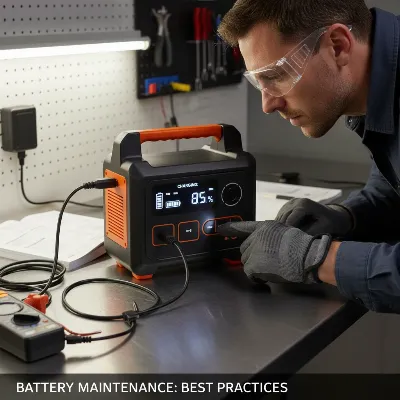 A person performing maintenance on a portable power station, emphasizing safety gear and proper charging practices.
Conclusion
Replacing the battery in your portable power station is a practical way to breathe new life into your essential power solution. By carefully following the safety guidelines, using the right tools, and understanding the specific requirements of your device, you can successfully perform this upgrade. Opting for a higher-quality battery, such as LiFePO4, can further enhance your power station’s longevity and reliability, ensuring it remains a dependable source of energy for years to come. With a fresh battery, you can continue to enjoy uninterrupted power, whether you’re off-grid, preparing for an emergency, or simply powering your daily adventures.
Frequently Asked Questions
When should I consider replacing my portable power station battery?
You should consider replacing your battery when you notice significant declines in run time, increased charging times, frequent low voltage warnings, or any physical damage like swelling or leaks. These are common signs that the battery’s health has deteriorated.
Can I upgrade my portable power station to a different battery type?
It is often possible to upgrade, for example, from an older lithium-ion (NMC) battery to a LiFePO4 battery, if the voltage, physical size, and connector types are compatible with your power station’s internal design. Always verify compatibility with the manufacturer’s specifications.
What is the typical lifespan of a portable power station battery?
The lifespan varies significantly by battery chemistry. Lead-acid batteries typically last 500-1000 cycles, while lithium-ion (NMC) batteries also offer around 800-1000 cycles. LiFePO4 batteries, however, are known for their exceptional longevity, often providing over 3500 charge cycles, equating to many years of reliable use.
Are there any risks involved in replacing the battery myself?
Yes, working with electrical components carries inherent risks, including electrical shock and short circuits. It is crucial to follow all safety precautions, use insulated tools, wear protective gear, and ensure the power station is completely disconnected from power before starting the replacement process. If you are unsure, consult a professional.
Frequently Asked Questions
When should I consider replacing my portable power station battery?
You should consider replacing your battery when you notice significant declines in run time, increased charging times, frequent low voltage warnings, or any physical damage like swelling or leaks. For instance, if your power station dies much faster than before, even after a full charge, it's a clear indicator.
Can I upgrade my portable power station to a different battery type?
It is often possible to upgrade, for example, from an older lithium-ion (NMC) battery to a LiFePO4 battery, if the voltage, physical size, and connector types are compatible with your power station's internal design. Always verify compatibility with the manufacturer's specifications to ensure safety and performance.
What is the typical lifespan of a portable power station battery?
The lifespan varies significantly by battery chemistry. Lead-acid batteries typically last 500-1000 cycles, while lithium-ion (NMC) batteries also offer around 800-1000 cycles. LiFePO4 batteries, however, are known for their exceptional longevity, often providing over 3500 charge cycles, equating to many years of reliable use.
Are there any risks involved in replacing the battery myself?
Yes, working with electrical components carries inherent risks, including electrical shock and short circuits. It is crucial to follow all safety precautions, use insulated tools, wear protective gear like rubber gloves and safety goggles, and ensure the power station is completely disconnected from power before starting the replacement process. If you are unsure, consult a professional.
What tools are essential for a safe battery replacement?
Essential tools for a safe battery replacement include a screwdriver set, a wrench set for terminals, and a multimeter to check voltage. Crucially, you should also use safety gear such as insulated tools, rubber gloves, safety goggles, and protective clothing to prevent electrical shock or injury.
How do I properly dispose of an old portable power station battery?
Proper disposal of old batteries is essential to protect the environment and prevent hazards. Do not simply throw them in the trash. Instead, take them to a certified battery recycling center or a hazardous waste collection facility in your area. Many electronics retailers also offer battery recycling programs.
Replace Your Portable Power Station Battery
This guide provides a comprehensive overview of the battery replacement process for portable power stations, ensuring safety and proper installation.
Place the power station on a stable, dry, and non-conductive surface. Ensure it is completely powered off and unplugged from all charging and output sources. Carefully remove the screws securing the casing and open it, noting the arrangement of internal components.
Identify the battery pack inside the casing. Crucially, always disconnect the negative (-) terminal first using an insulated wrench, then disconnect the positive (+) terminal. This minimizes the risk of short circuits during the process.
Carefully lift the old battery out of its compartment and set it aside for proper disposal. Place the new battery into the compartment, ensuring correct orientation. When reconnecting, always attach the positive (+) terminal first, then the negative (-) terminal, tightening all bolts securely.
Gently close the power station casing, ensuring no wires are pinched, and replace all screws. Once fully reassembled, plug the power station into its charger. Observe the charging indicator to confirm it's charging correctly and allow it to fully charge before its first use.

This was exactly what I needed! My portable power station was showing signs of degradation, like really slow charging. I followed the 7-step guide and successfully swapped out the old battery. It’s fantastic to have my power station performing optimally again for our camping trips.
Great info here. I’ve been wanting to upgrade my older lithium-ion battery to a LiFePO4 for the extra charge cycles. The instructions were clear, especially about matching the specifications. It took a bit longer than I expected to get everything disconnected, but the end result is worth it for the improved longevity.
The guide was mostly helpful for replacing the battery. My main issue was with finding a compatible replacement battery that wasn’t super expensive. It would have been great to have some recommendations for where to buy new batteries or specific brands that are easier to work with. Still, I got it done eventually.
I was so glad to find this guide! My old power station was barely holding a charge, and I thought I’d have to buy a whole new unit. Following these steps, I was able to replace the battery myself. It’s working like new now, and I saved a ton of money.