Few things are as frustrating as reaching for your portable power station, only to find it won’t hold a charge when you need it most. Whether you rely on it for camping trips, emergency home backup, or powering tools on a job site, a failing power station can disrupt your plans and leave you in the dark. The good news is that many common issues preventing a power station from holding its charge are often simple to diagnose and fix. Understanding the underlying causes and knowing the right troubleshooting steps can save you time, money, and the hassle of a dead battery. This guide will walk you through effective solutions, from basic checks to advanced resets and essential maintenance tips, helping you restore your power station’s reliability.
Understanding Why Power Stations Fail to Hold a Charge
A portable power station is a complex piece of equipment, and several factors can contribute to its inability to hold a charge. Identifying the root cause is the first step toward a successful fix. Often, the issue stems from the battery itself, the internal management system, or the external charging components.
Battery Degradation and Aging
All rechargeable batteries, particularly the lithium-ion cells commonly found in power stations, have a finite lifespan. Over time, and with repeated charge and discharge cycles, their chemical composition changes, leading to a natural reduction in capacity. Factors like frequent deep discharges (letting the battery drain to 0% regularly) or prolonged exposure to extreme temperatures (too hot or too cold) can accelerate this degradation. As a battery ages, it may struggle to hold a full charge or deliver power for as long as it once did.
Battery Management System (BMS) Malfunctions
The Battery Management System (BMS) acts as the “brain” of your power station, overseeing charging, discharging, and overall battery health. A BMS can sometimes misreport the state of charge, showing an inaccurate percentage. It might also enter a “protection mode” to safeguard the battery from conditions like over-voltage during charging, under-voltage from excessive discharge, over-current from heavy loads, or temperature extremes. When the BMS triggers protection, it can temporarily shut down the battery, preventing it from charging or discharging until the fault condition is addressed. Sometimes, the BMS might intentionally stop charging just before 100% to create a protective buffer, prolonging the battery’s overall lifespan and ensuring cell balance.
Charging Component Issues (Cables, Ports, Adapters)
The external components used to charge your power station are often overlooked culprits. A damaged or incompatible charging cable, a faulty AC adapter, or a dirty/loose input port on the power station itself can severely hinder or completely prevent a proper charge. Wear and tear, bent pins, or accumulated debris can interrupt the flow of electricity, making it appear as if the battery isn’t holding a charge when the power isn’t even reaching it effectively. Even the power source you’re plugging into can be a factor, such as an unstable wall outlet or an inefficient solar panel setup.
Environmental Factors and Overload Protection
Portable power stations are designed to operate within specific temperature ranges. Charging in excessively hot or cold environments can trigger internal safety mechanisms that slow down or halt the charging process to protect the battery cells. Similarly, connecting devices that collectively draw more wattage than your power station’s inverter can handle will activate its overload protection. This safety feature causes the unit to shut down or prevent output, giving the impression that it’s not holding a charge, when in reality, it’s preventing potential damage from excessive power draw.
Initial Troubleshooting: Simple Checks You Can Do
Before diving into complex solutions, it’s always best to start with basic, external checks. Many common charging issues can be resolved with a quick inspection and a few simple adjustments.
Inspect Charging Cables and Ports
Begin by thoroughly examining all charging cables, including the AC adapter, car charger, and solar panel cables. Look for any visible signs of damage such as fraying, cuts, or kinks. A damaged cable can’t deliver consistent power, if any. Next, inspect the charging port on your power station and the connector on the cable for any debris, dirt, or bent pins that might obstruct a solid connection. Gently cleaning the ports with a dry, non-conductive tool or compressed air can often resolve connectivity issues. After inspection, try using a different, known-good charging cable and adapter to rule out faulty accessories.
Verify the Power Source
The problem might not be with your power station, but with the electricity source itself. If you’re charging from a wall outlet, plug another device into the same outlet to ensure it’s functioning correctly. Avoid using overloaded extension cords or power strips, as they may not provide stable voltage or sufficient wattage for your power station. Instead, plug the power station directly into a different, reliable wall outlet. If you’re charging via solar panels, ensure they are clean, undamaged, and positioned in direct sunlight with no obstructions. Incorrect panel angle or insufficient sunlight will lead to poor charging performance.
Check for Overheating
Portable power stations generate heat during charging and discharging, especially when under heavy load. If the unit becomes excessively warm, its internal thermal protection mechanisms may slow down or stop the charging process to prevent damage. Feel the unit; if it’s hot to the touch, let it cool down in a well-ventilated, shaded area for a period before attempting to charge again. Ensure that the power station’s vents are not blocked by dust or other objects, as this can restrict airflow and lead to overheating. Operating your power station within a moderate temperature range, ideally between 50°F (10°C) and 85°F (30°C), is crucial for optimal performance.
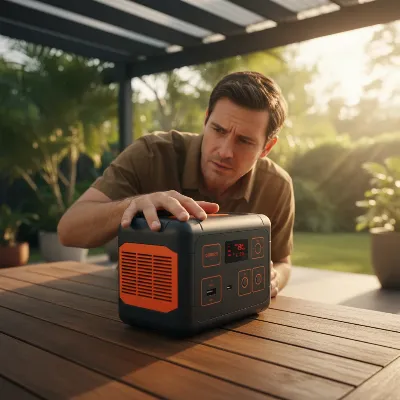 Man checking a portable power station for overheating in a well-ventilated outdoor setting, with sunlight and greenery in the background, realistic style.
Review Connected Devices and Load
If your power station turns on but doesn’t seem to charge or hold a charge effectively when devices are connected, check the total wattage of all devices you are attempting to power simultaneously. Exceeding the power station’s continuous or surge wattage rating will trigger its overload protection, causing it to shut down. This is a safety feature to prevent damage to both the power station and your connected electronics. Disconnect all devices, then try charging the power station alone. If it charges normally, reconnect devices one by one to identify which combination might be causing the overload. Consider using devices with lower power demands or staggering their startup if they have high initial surge requirements.
Advanced Solutions: Resetting and Calibrating Your Power Station
When external checks don’t resolve the issue, it’s time to look at internal system resets and battery calibration. These steps can often correct software glitches, reset the Battery Management System (BMS), and improve the accuracy of your battery’s charge readings.
Performing a Soft Reset
Many power stations can benefit from a simple soft reset to clear temporary system errors. To perform a soft reset, press and hold the main power button for 10 to 15 seconds until the screen turns off. Release the button, wait another 30 seconds for the system to fully discharge any residual power, then press the power button again to restart the unit. This process can resolve minor software glitches that might be interfering with charging or power delivery without affecting any stored settings. If your model has a specific “reset” button, often a small pinhole near the ports, consult your user manual and use a non-metallic tool to press it gently for a few seconds.
Resetting the Battery Management System (BMS)
If your power station suddenly stops charging or providing output, the Battery Management System (BMS) may have entered protection mode. This is a safety feature against conditions like over-voltage, under-voltage, over-current, or temperature extremes. Often, removing the fault condition (e.g., disconnecting an oversized load that caused an over-current trip) will allow the BMS to auto-reset after a short period. For under-voltage protection, connecting a compatible charger can sometimes “wake up” the BMS by signaling a safe charging source. Before any BMS reset attempts, always perform safety checks: disconnect all external loads and charging sources, and visually inspect the battery for signs of damage like bulging or leaking fluid. If such damage is present, do not proceed and seek professional help.
Battery Calibration: The Full Discharge and Recharge Cycle
An inaccurate battery charge reading can make it seem like your power station isn’t holding a charge when its internal “fuel gauge” is simply off. The most effective fix for this is battery recalibration, often referred to as a “deep cycle” process. To calibrate, fully discharge your power station until it completely drains to 0% and shuts itself off. Then, without interruption, charge it back to 100% using a reliable AC wall outlet. This full discharge and uninterrupted recharge cycle helps the BMS “re-learn” the battery’s true upper and lower charge limits, significantly improving the accuracy of the State of Charge (SoC) reading. Performing this calibration every 2-3 months is a good practice to maintain accuracy and can help prevent perceived issues with charge retention.
> “Battery calibration doesn’t directly extend battery lifespan but ensures accurate charge readings, which can help manage power use and identify genuine issues.” – Tech Battery Expert, Lead Engineer at PowerTech Solutions
Firmware Updates
Some modern power stations offer firmware updates that can improve performance, enhance battery management, and resolve known software bugs. Check your manufacturer’s website or app for any available firmware upgrades for your specific model. Installing the latest version can sometimes address underlying software glitches that contribute to charging inconsistencies or issues with holding a charge. Always follow the manufacturer’s instructions carefully when performing a firmware update to avoid complications.
 Person performing a firmware update on a power station via a mobile app, showing a digital interface and a power station in a modern, clean environment.
Preventive Maintenance for Long-Lasting Power
Ensuring your power station consistently holds a charge often comes down to good maintenance habits. Proactive care can significantly extend its lifespan and prevent many common issues.
Optimal Charging and Discharging Practices
To maximize battery health, avoid consistently draining your power station to 0% and don’t leave it fully charged for extended periods. Ideally, keep the battery’s charge level between 20% and 80% for regular use. For long-term storage, aim for a partial charge of around 50-60%. Periodically cycling the battery—using it and then recharging it—helps maintain its overall health and keeps the cells active. Always use the original charger and cables provided by the manufacturer, or ensure any replacements meet the recommended specifications, as incompatible chargers can damage the battery or BMS over time.
Proper Storage Conditions
Environmental factors play a crucial role in battery longevity. Store your power station in a cool, dry place away from direct sunlight, extreme temperatures, and high humidity. Avoid storing it in environments that are excessively hot (like a car trunk in summer) or extremely cold. A moderate room temperature is generally ideal. Protecting the unit from dust and moisture also prevents internal components from being damaged and ensures ports remain clean and functional. If your power station has protective caps for its ports, use them when not in use.
Regular Cleaning and Inspection
Make it a habit to regularly inspect your power station for any visible damage, such as cracks in the casing or loose components. Keep the charging ports and vents clean and free of dust and debris, as blockages can lead to overheating or poor connections. A soft, dry cloth can be used to wipe down the exterior, and compressed air can clear out vents and ports. If your power station is frequently exposed to outdoor elements, check seals and covers for integrity to prevent moisture ingress. Routine cleaning and inspection help catch minor issues before they escalate into major problems, ensuring your power station remains reliable.
When to Seek Professional Help or Warranty Support
While many power station issues can be resolved with DIY troubleshooting, there are situations where professional intervention is necessary. Knowing when to reach out for expert help can prevent further damage and ensure your safety.
Recognizing Serious Issues
If, after performing all the recommended troubleshooting steps—including checking cables, calibrating the battery, and resetting the BMS—your power station still won’t hold a charge, it might indicate a more serious internal problem. Signs such as physical damage (bulging, leaking fluid, or melted wires), persistent error codes that won’t clear, or a complete failure to power on despite being fully charged, often point to failing lithium cells or a faulty BMS that requires specialized repair. Tampering with these components without expertise can be dangerous due to high-voltage currents and the volatile nature of lithium batteries.
Understanding Your Warranty
Before attempting any complex repairs that involve opening the power station’s casing, always check your product’s warranty. Most manufacturers provide a warranty that covers defects in materials and workmanship for a specific period. Performing unauthorized repairs or opening the unit yourself will almost certainly void this warranty. If your power station is still under warranty, contact the manufacturer’s support team. They may offer free diagnostics, repair services, or even a replacement unit, saving you the cost and risk of a DIY fix. It’s always best to leverage manufacturer support if available.
Safety First: Avoiding DIY Risks
Portable power stations house high-voltage components and powerful lithium batteries that can be dangerous if mishandled. Attempting complex repairs without the proper tools, knowledge, and safety precautions can lead to electrical shock, burns, or even fire. If you are not confident or experienced in working with electronics, especially those involving high-capacity batteries, it is always safer to consult a professional technician. Prioritizing safety over a potential DIY cost saving is crucial. A qualified technician can diagnose and repair the issue safely and effectively, ensuring your power station operates correctly without posing a risk.
Conclusion
A portable power station that won’t hold a charge can be a significant inconvenience, but many of these issues are preventable or fixable with the right approach. By systematically checking your charging components, power sources, and environmental conditions, you can often pinpoint and resolve the problem quickly. Implementing advanced solutions like soft resets, BMS troubleshooting, and crucial battery calibration cycles can further restore your unit’s performance and accuracy. Moreover, consistent preventive maintenance—including optimal charging habits, proper storage, and regular cleaning—is key to ensuring your power station remains a reliable energy solution for years to come. Remember, while many fixes are within reach for the average user, always prioritize safety and consult professional support or your warranty when faced with complex internal issues or physical damage. With these steps, you can extend the life of your power station and confidently power your adventures and emergencies.
What steps will you take today to ensure your power station is always ready for action?
Frequently Asked Questions
How often should I calibrate my power station battery?
It is generally recommended to calibrate your power station battery every 2-3 months. This involves fully discharging the unit until it shuts off, then recharging it to 100% without interruption. This process helps the Battery Management System (BMS) maintain accurate charge readings and optimize performance.
Can a power station battery be replaced?
In some modular power stations, individual battery components may be replaceable. However, in many consumer-grade power stations, the battery is integrated into the unit and is not designed for user replacement. Attempting to replace the battery yourself often voids the warranty and can be dangerous due to high-voltage components.
What is a BMS, and why is it important?
A Battery Management System (BMS) is an electronic system that monitors and manages the battery’s health and performance. It protects the battery from conditions like overcharging, over-discharging, over-current, and extreme temperatures, ensuring safe operation and extending the battery’s lifespan.
Is it normal for a power station to stop charging at 98% or 99%?
Yes, it can be normal for some power stations to stop charging just short of 100% (e.g., at 98% or 99%). This is often a protective feature implemented by the BMS to create a small buffer, which helps prolong the overall lifespan of the battery cells by preventing constant “trickle charging” at maximum capacity.
What’s the ideal temperature for charging a power station?
The ideal temperature range for charging most portable power stations is typically between 50°F (10°C) and 85°F (30°C). Charging in extremely hot or cold environments can trigger safety mechanisms that slow down or stop charging, impacting efficiency and potentially damaging the battery over time.
