In today’s interconnected world, a portable power station is more than just a gadget; it’s a lifeline, providing crucial energy for everything from outdoor adventures to emergency home backup. At the heart of its reliable operation are the unsung heroes: the cooling fans. These tiny turbines work tirelessly to dissipate heat, ensuring your unit runs efficiently and safely. Over time, however, these fans can become choked with dust and debris, compromising performance and potentially shortening your power station’s lifespan. Keeping them clean is a simple yet vital DIY maintenance task that can save you from costly repairs and unexpected power outages. This guide will walk you through the safe and effective steps to clean your power station’s cooling fans, ensuring it remains a dependable source of power.
The Unseen Threat: Why Clean Power Station Cooling Fans?
Cooling fans play a critical role in maintaining the optimal operating temperature of your power station. Without them, internal components, especially the battery cells and inverter, would quickly overheat, leading to reduced efficiency and potential damage. Regular cleaning directly addresses several key issues:
- Preventing Overheating: Dust and lint act as insulators, trapping heat inside the unit and reducing the fans’ ability to move cool air in and hot air out. This forces the power station to work harder, generating even more heat and risking component failure.
- Maintaining Efficiency and Longevity: When fans are clogged, they can’t cool as effectively, causing the internal system to struggle. This increased strain can lead to higher energy consumption, reduced power output, and significantly shorten the overall lifespan of your power station. Dust accumulation on fan blades can reduce airflow by a substantial margin, forcing the unit to consume more power for less cooling.
- Reducing Operational Noise: A common symptom of dirty cooling fans is increased noise. As dust builds up on the blades and within the fan housing, it can create an imbalance or obstruction, leading to a louder, more strained whirring sound. Cleaning can restore quiet operation.
Understanding Your Power Station’s Cooling System
Most portable power stations utilize an active air-cooling system, which means they have internal fans that draw in cooler ambient air through intake vents and expel warmer air through exhaust vents. This continuous airflow is essential for regulating the temperature of sensitive internal electronics and battery packs. The vents are typically located on the sides, front, or back of the unit, often behind protective grilles. Recognizing these vents is the first step in effective cleaning, as this is where dust and debris accumulate, directly impacting the fan’s efficiency.
Essential Tools for a DIY Fan Clean
Before you begin, gathering the right tools will make the cleaning process smooth and effective. You’ll need:
- Soft-bristle brush: An anti-static brush or a clean, soft-bristle paintbrush is ideal for gently dislodging visible dust from grilles and surfaces.
- Compressed air duster canister: This is crucial for blowing dust out of hard-to-reach areas within the vents. Ensure you hold the can upright to prevent propellant discharge.
- Microfiber cloths: For wiping down the exterior and any easily accessible surfaces.
- Small screwdriver set (optional): Only if your power station’s exterior grilles are designed for simple, tool-assisted removal, and you feel comfortable doing so after checking the manual. Do not use this to open the main casing of the power station.
Safety First: Crucial Precautions Before You Begin
Safety is paramount when performing any maintenance on electronic devices, especially power stations that contain powerful batteries. Ignoring these precautions can lead to electric shock, damage to the unit, or voiding your warranty.
- Power Down Completely and Unplug: This is the most critical step. Ensure your power station is turned off entirely and disconnect all charging cables and connected devices.
- Read Your Manual: Always consult your power station’s user manual for specific cleaning instructions or warnings. Some manufacturers may have particular recommendations or prohibitions.
- Avoid Opening the Main Casing: For most DIY users, do NOT attempt to open the main case of your power station. This can expose you to live electrical components, damage internal wiring, and often voids the manufacturer’s warranty. The cleaning methods outlined below focus on external access.
- No Liquids Inside: Never spray water, cleaning solutions, or any liquid directly into the vents or onto the unit. Moisture can cause short circuits and irreparable damage.
- Beware of Static Discharge: Do NOT use a household vacuum cleaner directly on the vents of your power station. The static electricity generated by vacuum cleaners can damage sensitive internal electronics.
- Work in a Well-Ventilated Area: While unlikely to create significant fumes, working in a well-ventilated space is generally good practice.
Step-by-Step DIY Guide to Cleaning Power Station Cooling Fans
Follow these steps carefully to clean your power station’s cooling fans safely and effectively:
Step 1: Disconnect and Secure
|
Our Picks for the Best Power Station in 2026
As an Amazon Associate I earn from qualifying purchases.
|
||
| Num | Product | Action |
|---|---|---|
| 1 | Anker SOLIX C1000 Portable Power Station, 1800W (Peak 2400W) Solar Generator, Full Charge in 58 Min, 1056wh LiFePO4 Battery for Home Backup, Power Outages, and Outdoor Camping (Optional Solar Panel) |

|
| 2 | Anker SOLIX F3800 Portable Power Station, 3840Wh, LiFePO4 Batteries, Ultra-High 6000W AC Output with 120V/240V, Solar Generator for Home Backup, RVs, Emergencies, Power Outages, and Outdoor Camping |
|
| 3 | Anker SOLIX C300 Portable Power Station with Car Charging Cable, Outdoor 288Wh LiFePO4 Battery, 300W (600W Surge) Solar Generator, 140W Two-Way Fast Charging, for Camping, Traveling, and Emergencies. |
|
| 4 | 550W Power Station Compatible with Dewalt: LIVOWALNY Portable Generator DC 20V to AC 110-120V, Pure Sine Wave Power Inverter Battery Adapter Phone Charger 2 USB-A & 1 Type-C & 2 AC Outlet (Tool Only) |
|
| 5 | Anker SOLIX C1000 Gen 2 Portable Power Station, 2,000W (Peak 3,000W) Solar Generator, Full Charge in 49 Min, 1,024Wh LiFePO4 Battery for Home Backup, Power Outages, and Camping (Optional Solar Panel) |
|
| 6 | UGREEN Power Strip Surge Protector with 4 Power Outlets, 15w Wireless Charger, 20W PD3.0 USB C Fast Charging, 2 USB-C Ports, 2 USB A Ports, Desk Charging Station for Office, Conference, Home Use |
|
| 7 | BLUETTI Portable Power Station AC180, 1152Wh LiFePO4 Battery Backup w/ 2 1800W (2700W peak) AC Outlets, 0-80% in 45Min, Solar Generator for Camping, Off-grid, Power Outage |
|
| 8 | Jackery Explorer 2000 v2 Portable Power Station with 2x200W Solar Panels, 2042Wh LiFePo4 Battery, 2200W Solar Generator, 20ms UPS, USB-C PD 100W Fast Charging for Power Outages, Emergencies, Camping |
|
| 9 | Westinghouse 155Wh 150 Peak Watt Portable Power Station & Solar Generator, Modified Sine Wave AC Outlet, Backup Lithium Battery for Camping, Home, Travel, Indoor/Outdoor Use (Solar Panel Not Included) |
|
| 10 | 550W Portable Power Inverter Compatible with Dewalt 20V Battery, Power Station DC 20V to AC 110V Pure Sine Wave, Battery Power Adapter 2USB&Type-C, Generator Phone Charger LED Light Camping Emergency |
|
Begin by ensuring your power station is completely powered off. Unplug all charging cables, input sources (like solar panels or car chargers), and any devices connected to its output ports. Allow the unit to cool down if it has been recently in use or charging.
Step 2: External Dust Removal with a Soft Brush
Using your soft-bristle brush, gently sweep away any visible dust, lint, or debris from the exterior intake and exhaust vents. Pay close attention to the grilles and crevices where dust tends to accumulate. This initial pass helps to remove larger particles before using compressed air.
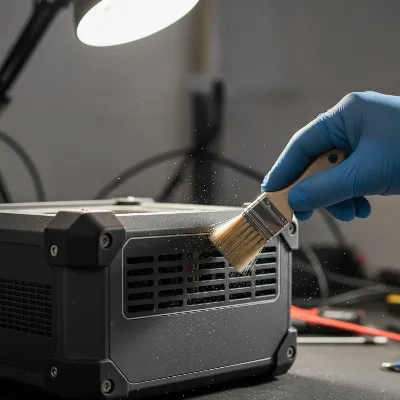 Technician using a soft-bristle brush to gently clean dust from the external vents of a portable power station, highlighting safety and attention to detail.
Step 3: Compressed Air Application
Now, use the compressed air duster. Hold the can upright and position the nozzle about 6 inches away from the vents. Use short, controlled bursts to blow dust out of the internal fan blades and heat sinks. Move the can across all vent openings to ensure thorough cleaning.
- Important: Avoid continuous spraying, as this can cause the can to get cold and potentially release liquid propellant. Never turn the can upside down, as this will expel liquid, which can damage internal components.
Step 4: Wipe Down the Exterior
After using compressed air, some dust might have settled on the exterior casing. Use a clean, dry microfiber cloth to wipe down the entire surface of your power station, removing any remaining dust or smudges. This also helps to keep the plastic or metal casing clean and in good condition.
Step 5 (Advanced/If Applicable): Gentle Grille Removal
- Proceed with extreme caution, and only if your power station’s design clearly allows for easy, tool-free or minimal-tool removal of external grilles (e.g., via simple clips or readily accessible screws that are clearly not part of the main casing seal).
- If you can safely remove an external grille without opening the main unit, do so carefully. Once removed, you can use the soft brush, compressed air, or even a slightly damp (not wet) microfiber cloth to clean the grille itself more thoroughly. Ensure the grille is completely dry before reattaching it. This step is usually not necessary for basic maintenance, and it’s safer to stick to external cleaning if you’re unsure.
Step 6: Reassembly and Testing
If you removed any grilles, carefully reattach them, ensuring all clips are secure or screws are tightened appropriately. Double-check that all cables are still disconnected. Once everything is back in place and completely dry, you can plug in and power on your power station. Listen for any unusual noises and observe if the fans operate more smoothly or quietly.
Maintaining Optimal Cooling Performance
Regular cleaning is just one aspect of maintaining your power station’s cooling system. Adopt these additional practices to ensure long-term optimal performance:
- Establish a Cleaning Schedule: For normal use, aim to clean your power station’s cooling fans every 3-6 months. If you operate it in dusty environments (e.g., workshops, construction sites, RVs, camping), consider more frequent cleaning, perhaps monthly.
- Optimal Placement: Always operate and store your power station in a cool, dry, well-ventilated area. Avoid direct sunlight, enclosed spaces like car trunks or unventilated garages, and soft surfaces that could block vents.
- Monitor Fan Behavior: Pay attention to how your fans typically sound and operate. If they start running more frequently, louder, or at full speed even under light loads, it’s a good indicator that a cleaning is needed, or there might be an internal issue requiring professional attention.
- Avoid Blocking Vents: Ensure nothing obstructs the intake or exhaust vents during operation. Leaving adequate space around the unit allows for proper airflow.
Conclusion
Your portable power station is a significant investment, and its longevity and reliable performance depend heavily on a well-maintained cooling system. By following these DIY cleaning steps and adhering to crucial safety precautions, you can effectively prevent dust buildup, mitigate overheating risks, and ensure your power station continues to deliver power efficiently for years to come. Remember, a little proactive maintenance goes a long way in safeguarding your energy independence. Regular cleaning, combined with smart usage and storage, ensures your power station is always ready when you need it most.
How often do you typically clean your power station, and what difference have you noticed in its performance afterward?
Câu Hỏi Thường Gặp
How often should I clean the cooling fans on my power station?
For typical use, cleaning every 3-6 months is recommended. If your power station is frequently used in dusty environments, such as construction sites or during outdoor adventures, it’s advisable to clean the fans monthly to prevent significant dust accumulation.
Can I use a vacuum cleaner to clean the vents?
No, it is generally not recommended to use a vacuum cleaner directly on your power station’s vents. Vacuum cleaners can generate static electricity, which poses a risk of damaging the sensitive internal electronic components of the power station. Stick to soft brushes and compressed air.
Is it safe to open my power station to clean the fans more thoroughly?
For most DIY users, it is strongly advised not to open the main casing of your power station. Doing so can expose you to electrical hazards, damage internal components, and will likely void your warranty. Focus on external cleaning methods unless the manufacturer explicitly provides instructions for safe internal access.
What if my power station fan is still noisy after cleaning?
If your power station’s fan remains noisy or exhibits unusual sounds like grinding or clicking after a thorough cleaning, it could indicate a more serious internal issue such as a failing fan bearing or a deeper obstruction. In such cases, stop using the unit and contact the manufacturer or a qualified service technician for professional diagnosis and repair.
Will cleaning the fans improve my power station’s charging speed?
Directly, cleaning the fans will not increase charging speed. However, by preventing overheating, clean fans ensure your power station operates at its optimal temperature, which is crucial for efficient charging and discharging cycles. Overheating can lead to reduced performance, including slower charging.
